“Learn how to create a Facebook business page in 2026. Master the new Meta Business Suite with our step-by-step guide and start capturing buyer leads today!”
Do you want more customers to find your brand online? You need to know how to create a Facebook business page.
Many business owners think Facebook is outdated. They are wrong. Facebook remains one of the most powerful tools for capturing leads, building trust, and driving sales. If you do not have an active page, you leave money on the table. Your competitors will gladly take those customers.
In this guide, we will show you exactly how to make a business Facebook page. We cover the latest 2026 Meta Business Suite updates. We also share the exact Facebook page setup steps you need to take to turn your page into an automated lead-generation machine using Wishpond.
Let’s get started.
Why You Still Need a Facebook Business Page in 2026
Before we jump into the setup process, let’s look at the numbers. You might wonder if learning how to make a Facebook business page is worth your time. The data speaks for itself:
- Massive Reach: According to Demand Sage, Facebook boasts over 3.07 billion monthly active users. Your target audience is definitely using the platform.
- High Daily Engagement: Data from Hootsuite shows that the average user opens the Facebook app roughly 280 times a month, giving your brand hundreds of opportunities to capture their attention.
- Customer Trust: Sprout Social reports that 76% of consumers buy from brands they feel connected to on social media. A professional page builds that essential trust.
Therefore, setting up your page is not just about having a social media presence. It is about building a scalable sales channel.
Phase 1: How to Create a Business Facebook Page (Step-by-Step)
Creating your page takes less than ten minutes. Follow these simple steps to get your foundation right.
Step 1: Log In to Your Personal Facebook Account
To create a business page, you first need a personal profile. Facebook requires this to verify your identity. Do not worry. Your personal profile and business page stay completely separate. Your friends will not see your business admin activities, and your business followers will not see your personal weekend photos.
Step 2: Open the Pages Menu
Once you log in, look at the left-hand menu on your newsfeed. Click on Pages. If you do not see it immediately, click See More and scroll down. Next, click the button that says + Create New Page.
Step 3: Choose Your Page Name and Category
This step is crucial for search visibility.
- Page Name: Enter your official business name. Keep it clean and recognizable. Do not stuff keywords here.
- Category: Start typing words that describe your business. Facebook will give you a dropdown menu of options. You can choose up to three categories. Choose the most accurate one first, as this helps people find you when they search for specific services.
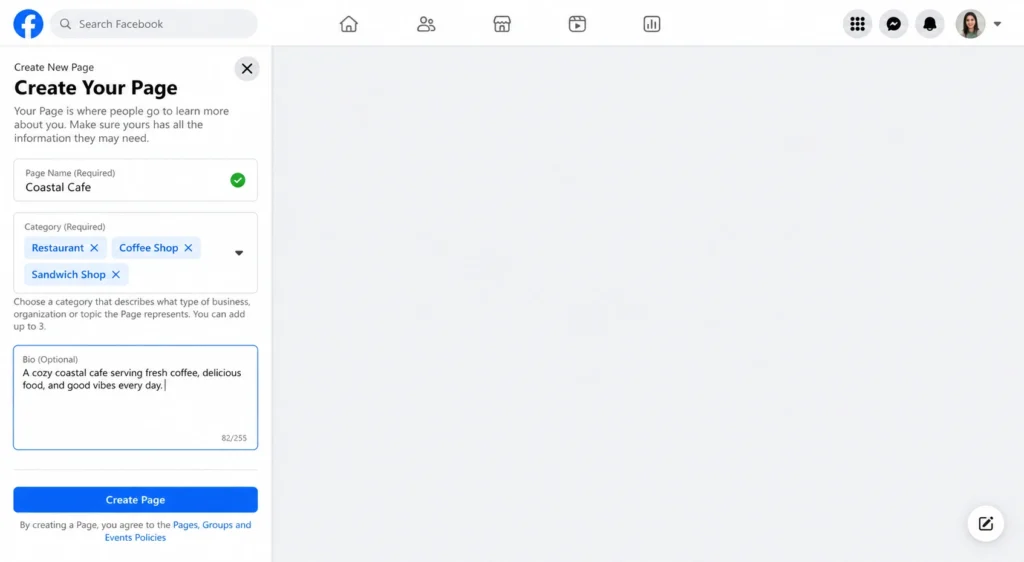
Step 4: Write a Punchy Bio
You have 255 characters to tell people what you do. Keep it short. State your core offer and how you help your customers. For example: “We provide emergency plumbing services in Chicago. Available 24/7.” Click Create Page to save your progress.
Phase 2: Essential Facebook Page Setup & Optimization
Now that your page exists, you need to make it look professional. A blank page looks sketchy. You must add the right visual elements and contact details.
Step 5: Upload Your Profile and Cover Photos
Visuals matter. Your profile picture should be your company logo. Ensure it looks good in a small circle. The ideal size is 176 x 176 pixels on computers.
Next, add a cover photo. This is the large banner at the top of your page. Use this space to show off your team, your best product, or a current promotion. The ideal cover photo size is 820 x 312 pixels. Keep important text in the center so it does not get cut off on mobile devices.
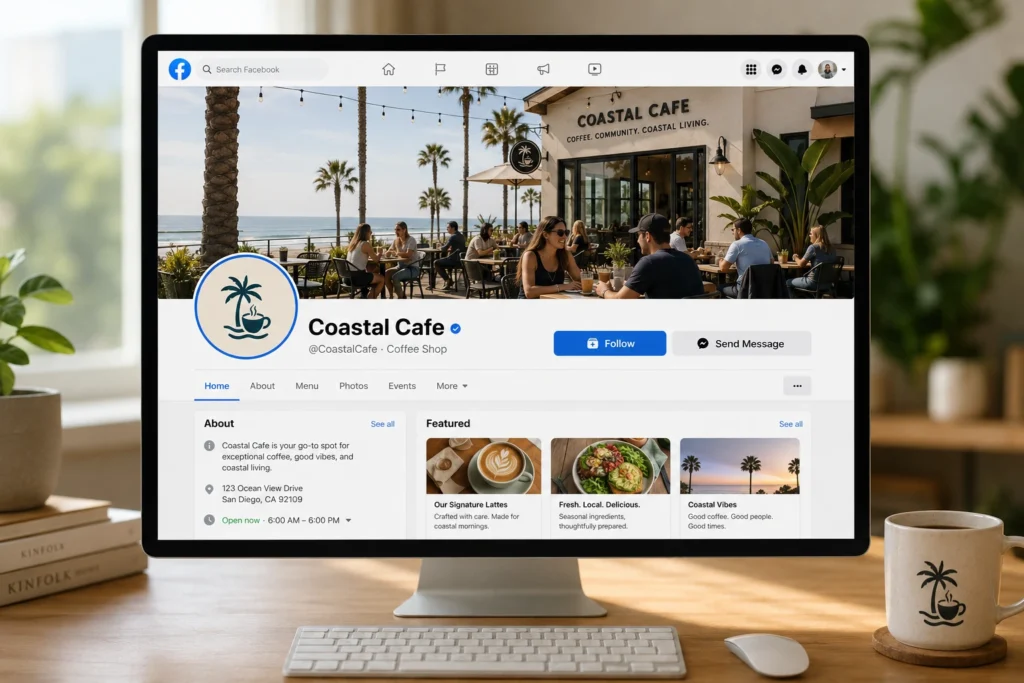
Step 6: Add an Action Button (CTA)
You want visitors to take action. Facebook lets you add a prominent button at the top of your page. Click Add Action Button. You can choose options like:
- Book Now
- Contact Us
- Send Message
- Sign Up
- Learn More
Choose the button that aligns with your primary business goal. If you want more phone calls, choose Call Now. If you want email subscribers, choose Sign Up.
Step 7: Fill Out All Business Details
Scroll down to the About section. Fill out every single field.
- Add your website URL.
- Input your phone number.
- Add your business email.
- Set your operating hours.
- Add your physical address (if you have a storefront).
Incomplete profiles hurt your search rankings. Take the time to fill everything out. For a deeper dive into making your profile stand out, read our full guide on how to optimize your Facebook Business Page.
Phase 3: Navigating the New Meta Business Suite
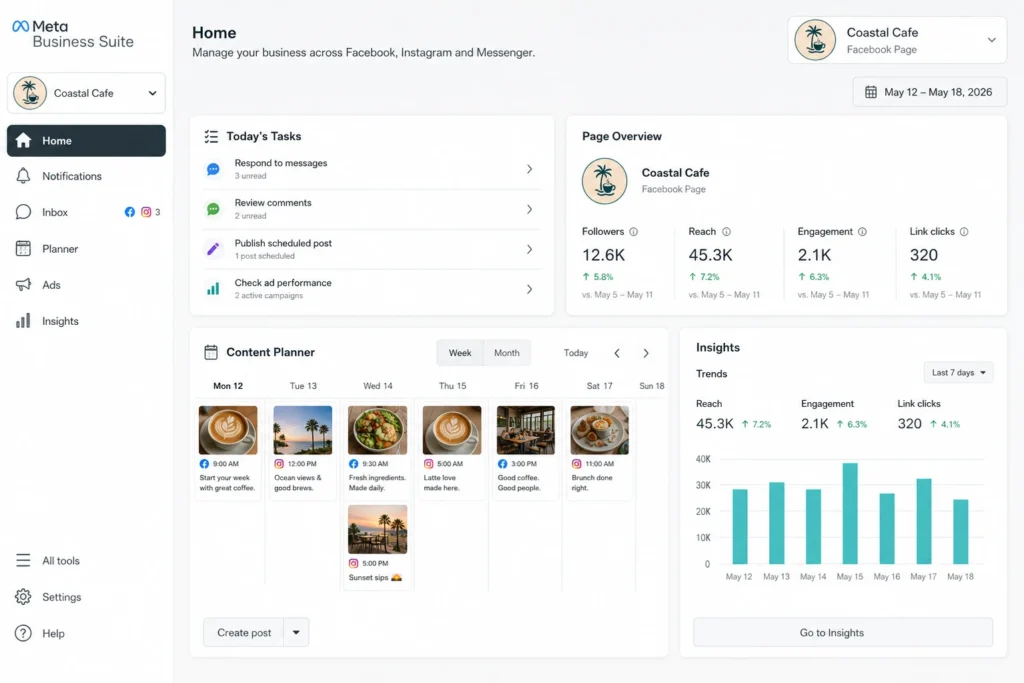
Facebook recently moved all page management tools into the Meta Business Suite. This dashboard is your new command center. You will use it to manage your page, reply to messages, and track your performance.
Connect Instagram and Facebook
You can manage both platforms in one place. Go to the Meta Business Suite settings and click Business Assets. Add your Instagram account. Now, you can reply to Facebook comments and Instagram direct messages from a single inbox. This saves you hours of switching between apps.
Use the Content Planner
The Meta Business Suite includes a powerful calendar. You can write your posts in advance and schedule them to go live at specific times. Consistent posting keeps your audience engaged.
Review Your Insights
You must track what works. The Insights tab shows you how many people see your posts and how they interact with them. Look at the data once a week. Identify which posts get the most likes and comments. Then, create more of that specific content.
Phase 4: Crafting a Winning Posting Strategy
You learned how to create a Facebook business page. Now you need to post content that drives traffic. Do not just post sales pitches. People use social media to learn and be entertained.
Follow the 80/20 Rule
Keep your content balanced. Make 80% of your posts educational, entertaining, or inspiring. Use the remaining 20% to promote your products or services directly.
Mix Your Formats
Facebook rewards pages that use different types of media. Try the following formats:
- Short-form Videos (Reels): Reels get the highest organic reach right now. Show behind-the-scenes footage of your business.
- Images: Post high-quality photos of your products or happy customers.
- Text Posts: Ask simple questions to spark conversations in the comments.
- Live Video: Go live to answer customer questions in real-time.
Build Community With Groups
Pages represent your brand, but groups build communities. You can link a Facebook Group directly to your business page. This creates a dedicated space for your most loyal customers to interact. Want to learn how to do this effectively? Read our comprehensive guide on using Facebook groups for business.
Phase 5: Lead-Gen Setup & Wishpond Integration
Likes and comments do not pay the bills. You need a system to turn your Facebook audience into paying customers. This is where most business owners fail. They build an audience but have no way to capture their contact information.
You need to move people off Facebook and onto your email list.
Automate Your Lead Generation
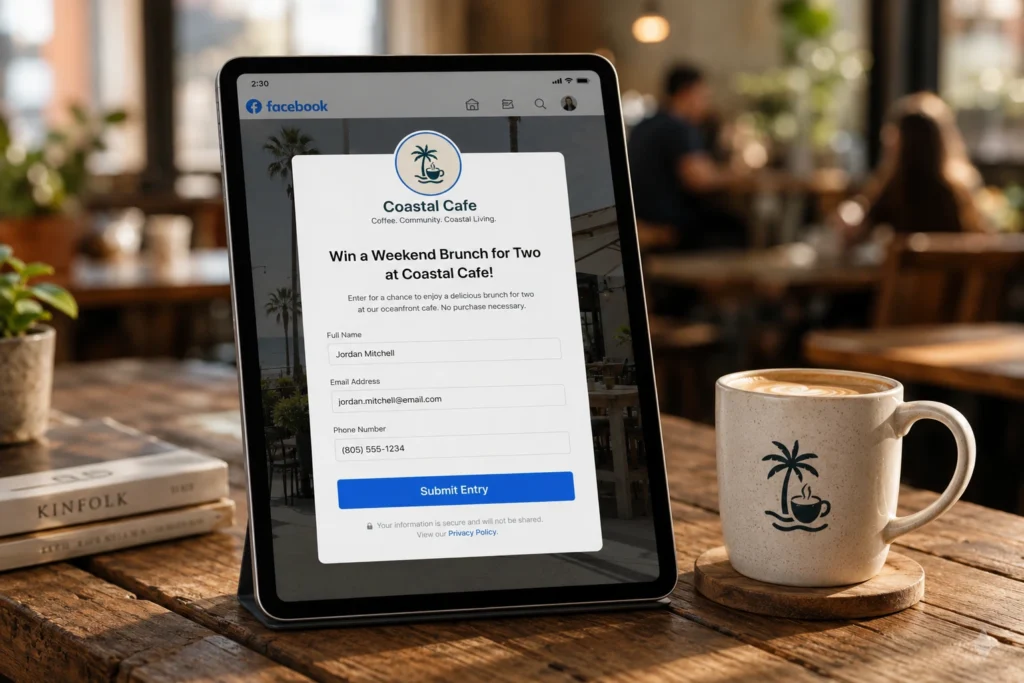
You can streamline this entire process using Wishpond. Wishpond connects directly to your Facebook page and helps you capture leads automatically. Instead of hoping people click your website link, you can set up targeted campaigns.
For example, you can run a social media contest right on your page. Users enter their email addresses to win a prize. Wishpond captures those emails and drops them into an automated email marketing campaign. You instantly turn passive scrollers into warm leads.
Using powerful tools completely changes how you operate online. Discover the exact strategies we use by reading our post on unlocking local business success on Facebook with Wishpond.
Phase 6: Scaling With Ads (A Quick Primer)
Organic reach on Facebook is lower than it used to be. Facebook is a “pay-to-play” platform. If you want to reach thousands of new people quickly, you need to spend a little money.
Boosting Posts vs. Meta Ads Manager
You will often see a blue Boost Post button under your content. Pressing this is an easy way to show your post to more people. However, boosting posts gives you limited targeting options.
If you want the best return on your investment, use the Meta Ads Manager. This tool lets you target specific demographics, interests, and behaviors. You can show your ads only to people who live within five miles of your store and have an interest in your specific industry.
Running ads can feel intimidating, but it is highly profitable when done right. To get started, check out our guide on how to boost your reach with Facebook ads for local businesses. If you run a smaller operation, you will also benefit greatly from our specific breakdown of Facebook ads for small businesses.
Conclusion
Learning how to create a Facebook business page is just the first step. To succeed in 2026, you must optimize your profile, use the Meta Business Suite, and post engaging content consistently.
Furthermore, you must have a system to capture leads. Do not rely solely on the platform. Build your email list. Use integrations to capture customer data and automate your marketing. When you combine a strong Facebook presence with smart lead-generation tools, your business will grow faster than ever.
Are you ready to turn your social media followers into paying customers? We can help you automate your marketing and scale your sales. Book a demo with the Wishpond team today to see our tools in action.
Frequently Asked Questions (FAQs)
Does it cost money to create a Facebook business page?
No. Creating a Facebook business page is completely free. You only pay money if you decide to run Facebook ads or boost your posts.
Can I see who visits my Facebook business page?
No. Facebook protects user privacy. You cannot see the specific names or profiles of people who view your page. However, Page Insights will show you the general demographics (age, location, gender) of your audience.
Do I need a personal Facebook account to create a business page?
Yes. You must have a personal profile to create and manage a business page. Facebook uses your personal account to verify that a real person manages the business entity. Your personal information remains private.
How many business pages can I create?
Facebook does not have a strict limit on how many pages you can manage. You can create multiple pages for different business locations or different brands under one personal account.
What is the difference between a Facebook Profile and a Facebook Page?
A profile is for personal use to connect with friends and family. A page is for businesses, brands, and public figures. Pages offer specific tools like analytics, advertising access, and automated messaging that personal profiles do not have.