Going live on TikTok is no longer just a casual way to chat with your followers. It has evolved into a multi-billion-dollar real-time engagement and commerce engine.
For brands, creators, and small- to medium-sized businesses (SMBs), going live provides an unedited, authentic connection with your audience. This real-time interaction can significantly boost your visibility and accelerate your sales cycles.
This comprehensive guide covers everything you need to know to broadcast professionally, navigate the updated system requirements, maximize monetization tools, and execute a high-converting live commerce strategy.
What is TikTok Live?
TikTok Live is a feature that lets you create a live video stream for your audience.
You can make these videos only available to your followers, or you can make them public – which is an excellent way for new people to discover your account.
TikTok is all about short video content, but the platform’s Live feature offers a great opportunity to create longer videos. Livestreams are one of the best TikTok trends for businesses and regular creators to use.
Instead of just trying to go viral and posting about what’s trending, TikTok Live lets you create a new type of content for a more intimate connection with your audience.
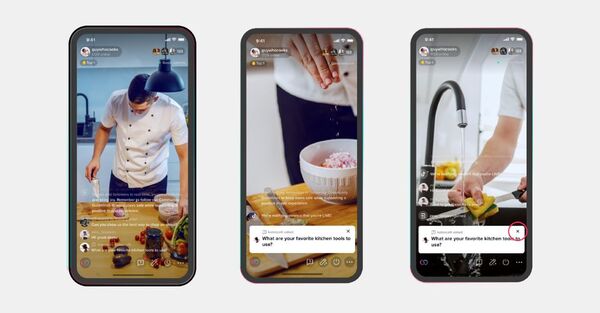
Updated Criteria: Requirements to Go Live on TikTok
TikTok segments live access privileges based on functionality, account verification status, and age compliance to ensure community safety.
- Age Compliance: Creators must be at least 18 years of age to activate the live streaming console, receive virtual gifts, or access shopping features.
- Standard Mobile Live Access: Creators require a minimum baseline of 1,000 organic followers to unlock standard mobile broadcasting.
- TikTok Shop & Live Commerce Privileges: For businesses and creators looking to tag and sell physical products directly through TikTok Shop Live, access can be unlocked with lower follower thresholds by registering a verified TikTok Business Account and linking an approved TikTok Shop merchant dashboard.
- TikTok LIVE Studio (Desktop Platform): Access to TikTok’s native Windows/Mac encoding desktop software requires a brief probationary streaming period or advanced creator agency onboarding.
How to Go Live on TikTok: A Step-by-Step Guide
Step 1: Access the Creation Interface
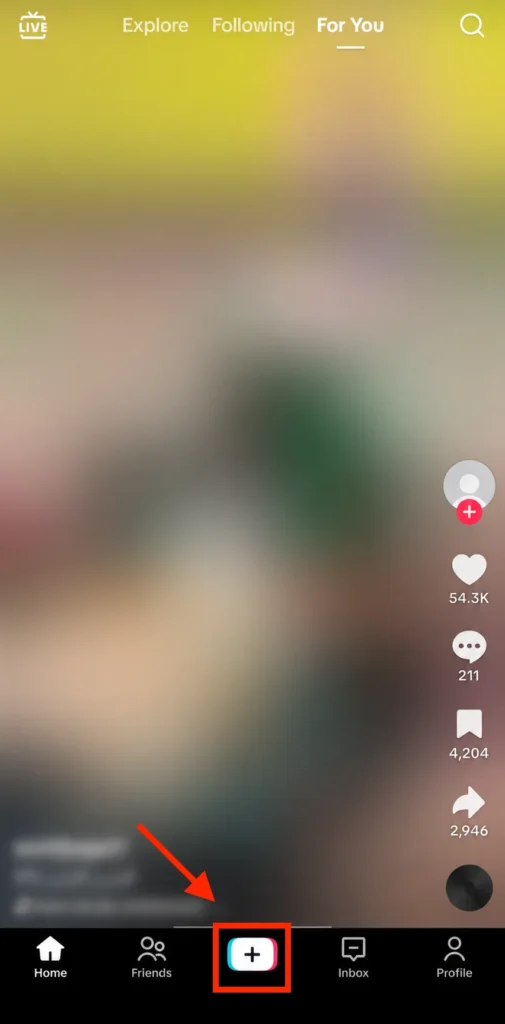
Open the TikTok application on your mobile device and tap the prominent (+) Create button located at the bottom-center of the primary navigation panel.
Step 2: Slide to the LIVE Console
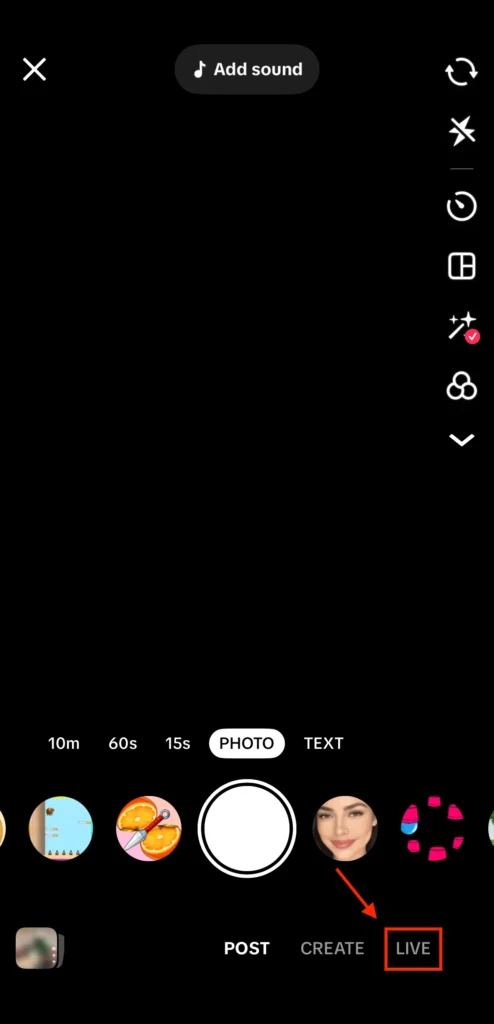
Scroll through the recording options at the very bottom of the screen (e.g., Camera, Templates) until you select LIVE.
Step 3: Configure Your Broadcast Metadata
Before launching your broadcast, optimize your settings on the preview layout screen:
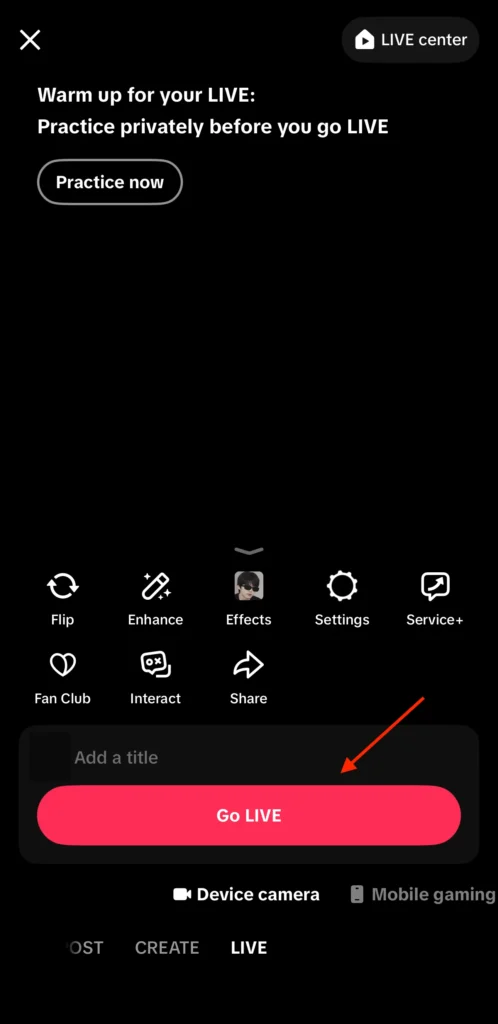
• Add a Captivating Title: Create a clear, compelling title (up to 32 characters) that clearly states the focus of your stream (e.g., “Live Q&A + Exclusive Shop Discounts!”).
• Select Your Topic Category: Assign your stream to an accurate category (e.g., Shopping, Tech, ASMR, Education). This helps TikTok’s real-time recommendation engine push your stream to interested users’ For You Pages (FYP).
• Set Up Filters and Visual Effects: Apply smoothing filters or brand-specific green screens using the left-hand options menu.
Step 4: Add Product Links and Go Live
If you are running a business or affiliate stream, tap the Shopping (Basket) icon to select and sequence products from your integrated TikTok Shop catalog. Once your setup is complete, tap the red Go LIVE button. A 3-second countdown will begin, and your broadcast will be live across the network.
2026 Monetization Mechanics: Earning Revenue While Live
TikTok provides an expansive suite of native monetization features built directly into live streams:
- TikTok Shop Live Commerce: Earn direct revenue by selling physical goods or collecting affiliate commissions on products pinned to your live screen during the broadcast.
- LIVE Subscriptions: Allow your most dedicated community members to pay a predictable monthly recurring fee. In exchange, they receive custom badges, subscriber-only chat access, exclusive emotes, and dedicated subscriber-only live streams.
- Virtual Gifts & Diamonds: Viewers can purchase TikTok Coins to send you animated virtual gifts during your stream. TikTok converts these gifts into “Diamonds” within your creator balance, which can then be withdrawn as real-world currency.
The TikTok Live Commerce Playbook (SMB & Brand Blueprint)
Live shopping has transformed small business retail operations. Below is the tactical framework used by top-converting brands to design, execute, and analyze high-ROI Live Shopping events.
1. Pre-Stream Optimization & Funnel Seeding
Never launch a shopping live stream without warming up the algorithm.
- Publish a “Seed” Video: Post a high-quality organic short-form TikTok video 1 to 2 hours before your scheduled live stream.
- Use the Live Anchor: Ensure this video explicitly mentions your upcoming live event. When users see your video on their FYP while you are broadcasting, a pulsating red avatar ring will appear. This allows viewers to tap through and enter your live stream instantly, turning video views into immediate live shoppers.
2. Dynamic Product Pinning & Real-Time Demonstrations
Keep your product demonstrations dynamic and highly interactive:
- The Live Assistant Modality: If possible, have a team member operate your TikTok Shop merchant backend on a separate laptop while you host the stream.
- Pin as You Speak: As you hold up, wear, or demonstrate a specific item, immediately pin that exact item to the bottom of the stream viewing interface using the store management tool. This makes it incredibly easy for viewers to buy without having to search through your entire catalog.
3. Implementing Scarcity Mechanics and Flash Discounts
Live shopping thrives on urgency and fear of missing out (FOMO).
- Exclusive Live Coupons: Drop limited-quantity platform coupons that are only valid during the live broadcast.
- Flash Giveaways: Announce milestones (e.g., “When we hit 50,000 likes on this stream, we are unlocking a 40% flash discount on product number three!”). This gamifies the experience, keeping retention high and signaling positive engagement to the TikTok algorithm.
4. Post-Live Performance Analytics Review
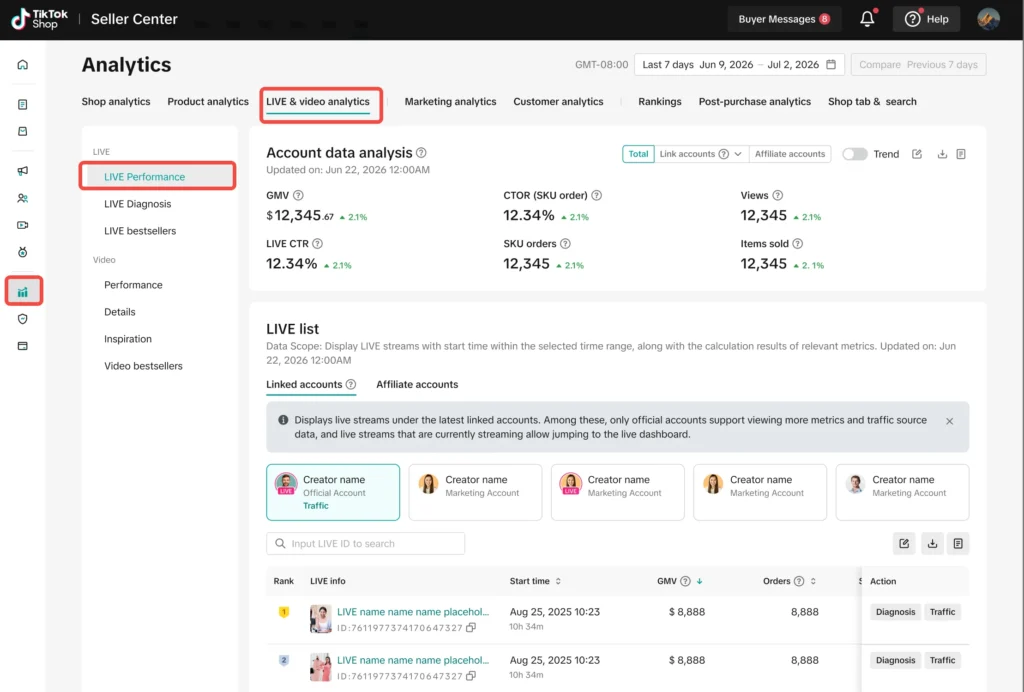
Once your stream ends, dive deep into your TikTok Shop analytics dashboard. Evaluate key performance metrics to optimize your strategy for future events:
- Peak Concurrent Viewers (PCV): Identify the exact moments or product demonstrations that drove the highest viewer spikes.
- Viewer Retention Curve: Pinpoint where audience drop-offs occurred to refine your script and pacing.
- Product Click-Through Rate (CTR) & Conversion Rate: Analyze which pinned items generated the highest purchase intent and actual sales.
10 Essential Tips for Success When You Go Live On TikTok
1. Prioritize Network Stability:
Always stream over a high-speed fiber Wi-Fi network or a stable 5G connection. A lagging or pixelated stream will cause viewers to quickly drop off.
2. Invest in High-Quality Audio:
Viewers will tolerate average video quality, but they will quickly leave if your audio is muffled, echoing, or full of background noise. Use a reliable wireless clip-on microphone (like a DJI Mic or Rode Wireless) to ensure your voice sounds clear.
3. Optimize Your Lighting Setup:
Avoid harsh overhead shadows. Position a large ring light or softbox directly behind your camera console to evenly illuminate your face or products.
4. Use a Stable Camera Mount:
Always secure your mobile device using a sturdy tripod. Shaky, handheld video looks unprofessional and distracts from your content.
5. Appoint Dedicated Stream Moderators:
Do not try to manage a live stream entirely on your own. Assign trusted team members or community members as moderators. They can pin important comments, answer basic questions, and instantly mute or block toxic accounts.
6. Keep Pacing Fast and engaging:
The average TikTok attention span is incredibly short. Keep your energy high, greet new viewers as they join, and clearly restate the purpose of your stream every few minutes.
7. Incorporate Clear Visual Cue Cards:
Write out your main talking points, product prices, or discount codes on large, clear cue cards and position them right behind your camera setup. This helps you stay on track without looking away from your audience.
8. Keep Viewers Engaged in the Chat:
Treat your live stream like a two-way conversation. Read viewer comments out loud, answer their questions in real-time, and ask for their feedback to build a strong connection.
9. Collaborate with Guest Co-Hosts:
Use the Multi-Guest or Co-Host (LIVE Match) features to bring in influencers, customers, or brand partners. This splits the screen and instantly exposes your brand to their follower base.
10. Maintain Strict Guideline Compliance:
Ensure your stream adheres to TikTok’s Community Guidelines. Avoid using banned keywords, displaying restricted items, or leaving your camera unattended for long periods, as this can result in an automated shadowban or stream termination.
Why is Going Live On TikTok a Good Idea?
Streaming a live broadcast lets creators and brands connect with their audience in real-time. It’s a great form of content to directly engage with users and show off a more realistic side of your TikTok account.
If you want your audience to get to know you a bit better, then going live is the best way to do this.
Live broadcasts are also more exclusive, so you can use them for unique moments and events.
With TikTok live, you can provide a behind-the-scenes perspective to create a more intimate connection with TikTok users. It’s also just a fun way to break up the regular TikTok videos that users see on their feed.
After we ran a webinar with client acquisition specialist Amy Walker, she recommended doing live videos as one of the most important free organic lead generation tactics. As she said:
“Live video is the thing that breaks the algorithm and gets you SO much more traction.”
TikTok Live Ideas
There are infinite possibilities for you to use when you go live on TikTok. Here are some ideas that always work well:
- Live Q&A sessions
- A behind-the-scenes look at your business
- A live contest announcement
- A live session that shares tips and tricks
- A conversation with another creator or brand
- Live tutorials (workout videos, cooking lessons, etc.)
- A live music performance
- Promoting a product/product demo
How to Make Money With TikTok Live
Creators can also make money when they go live on TikTok.
With TikTok’s gifting feature, followers can support you by sending virtual donations. You can earn gift points and change them for cash.
Your audience can’t directly send you money. They have to purchase TikTok coins, which they can send you as a tip to help you earn gift points.
People can purchase coins in bundles that range from 100 to 10,000. These are used to buy and send virtual gifts. When you earn gift points, you can turn them into diamonds, which are worth half the value of the coins. Each diamond is worth $0.05.
The downside is that TikTok keeps 50% of everything you earn.

How to Go Live With Someone On TikTok
You don’t just have to do your broadcasts solo. You can also invite people to share the space. Each event allows up to 20 moderators at once.
This is a great way to expand your reach and tap into the audiences of co-hosts.
Here’s how to do this:
- Follow the steps listed above on how to go live
- There is a circular blue/pink icon at the bottom left when you’re live. Tap on this to invite others to join your room as a co-host
- Now you’ll see a list of people who have requested or are watching your live broadcast. Choose the people you want to invite to join the live session and tap Add
Viewers can also join someone else’s live stream.
To do this, tap on the two-smiley icon near the comment box. This sends a request to join the live TikTok video. If the host accepts, you’ll connect on the live stream with the host, and your followers will be notified that you’re streaming live.

How to Promote Your Live TikTok Stream
Before you go live on TikTok, you must promote your live stream to make sure you get viewers.
Always do a TikTok post about the broadcast, notifying your audience when you will be going live.
You can also advertise your live stream on your other social media channels for maximum viewers. If it’s an important event, you could even mention it in your email marketing strategy.
And remember to go live when your audience is most active. Your followers will receive a notification when you start your broadcast, so try to time this when they’re already on the platform.
It’s Time to Go Live On TikTok
If you meet all the requirements to go live, what are you waiting for? TikTok’s Live feature is an excellent way to ramp up your engagement and create a deeper connection with your followers. You can also use a successful livestream to make some money too!
So, if you’re looking for TikTok ideas, then going live is always a winner. Just follow the four simple steps and have fun. Live might just become your new favorite TikTok feature.
TikTok LIVE Frequently Asked Questions
Q: Can I go live on TikTok without 1,000 followers?
A: Yes. If you operate an authorized business entity, you can open an official TikTok Shop Merchant account. By linking your official business profile to your approved merchant backend dashboard, you can unlock immediate mobile LIVE privileges to sell products, bypassing the standard 1,000-follower requirement.
Q: How do I switch between the front and rear cameras during a stream?
A: Once your stream is live, tap the Flip camera icon located on the right-hand settings panel. You can switch back and forth between the front and rear cameras seamlessly without interrupting your broadcast.
Q: Do TikTok Live streams automatically save to my profile grid?
A: No, live broadcasts do not automatically post to your public feed. However, TikTok stores a copy of your stream in your LIVE Replays archive (accessible via your Creator Tools menu) for 30 days. From there, you can download the full video recording to clip out high-performing segments for short-form video content.
Q: What causes a TikTok Live stream to get banned or flagged?
A: Streams are typically flagged by automated moderation systems for copyright violations (such as playing unauthorized background music), long stretches of silence or inactivity, displaying dangerous actions, or using aggressive language in the chat. Always use a dedicated moderator to maintain a safe, positive streaming environment.